 measure
How to Track Your Brand's Visibility in Claude (2026)
Claude is increasingly the assistant professionals reach for. Here is how to check whether it recommends you when it matters.
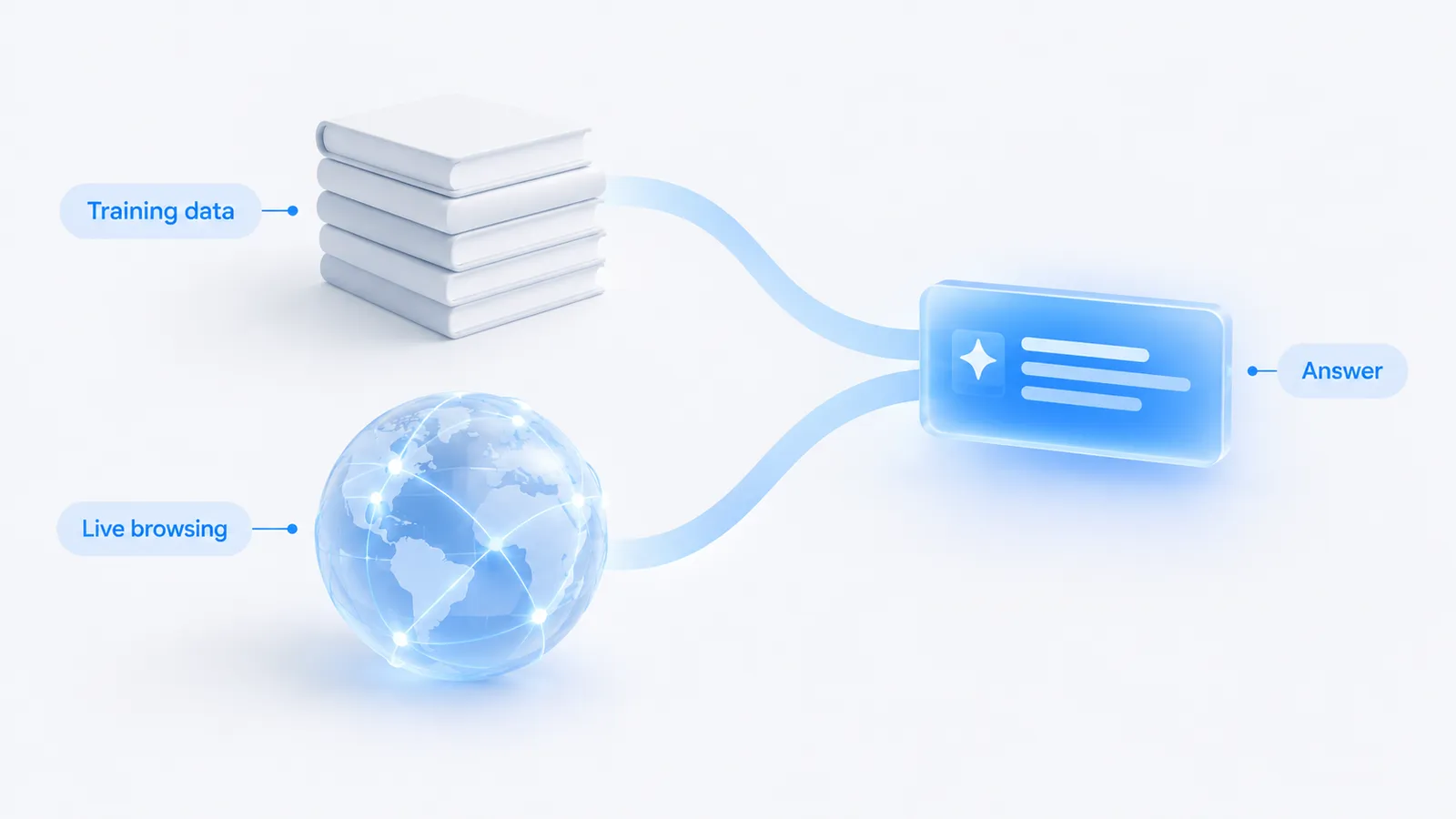
- Claude recommends brands from its training data, plus live sources when browsing is enabled, so what it says about you reflects both what the web has published and what it can fetch in the moment.
- Claude is worth tracking on its own because it skews toward research, analysis and technical work, which means the people asking it for recommendations are often the ones who sign off on the purchase.
- To track it, run a fixed set of your buyers' real questions on a schedule and record whether Claude names you, which rivals it names instead, and which sources it cites.
- To improve, get cited across the trusted sources Claude already trusts and publish clear, well-structured content that models can quote without ambiguity.
How Claude decides which brands to recommend
When you ask Claude for the best tool, agency or product in a category, it draws on two things. The first is its training data: the large body of text it learned from, which fixes a baseline picture of who the credible players in your market are. The second, when browsing is switched on, is live retrieval: Claude can fetch current pages and cite them directly in its answer. Most professional use runs through Claude.ai and the Claude apps, where the model leans on what it already knows and, depending on the mode, pulls in fresh sources to support specific claims.
The practical consequence is that Claude's recommendation of your brand has two inputs you can influence. Training data rewards brands that the wider web has consistently described as credible over a long period. Browsing rewards brands with clear, current, quotable pages that a model can retrieve and cite on the spot. A brand that is strong on both gets named confidently and cited by name; a brand that is absent from one or the other is easy for the model to skip. This is the same mechanic behind LLM citations across every assistant, and it is why the fix is rarely a single tactic.
Why Claude is worth tracking on its own
It is tempting to treat all the assistants as one channel and track them together. For a rough read that is fine, but Claude earns separate attention because of who uses it and for what. Claude is widely used for work-heavy tasks: long-document analysis, research synthesis, drafting, and technical and developer work. Those are not idle queries. They are the tasks decision makers do when they are evaluating options, and the person running them is often close to the one who signs the contract.
For a B2B or SaaS company, that changes the stakes. If a prospect asks Claude to compare vendors in your category while they are scoping a project, being on the short list it returns shapes the deal before you ever appear in a CRM. The developer audience matters for the same reason: engineers ask Claude which library, platform or tool to use, and those recommendations harden into defaults across a team. A brand can rank well in Google and still be missing from the answer Claude gives a technical buyer, because the two systems weigh evidence differently.
How to track your visibility in Claude
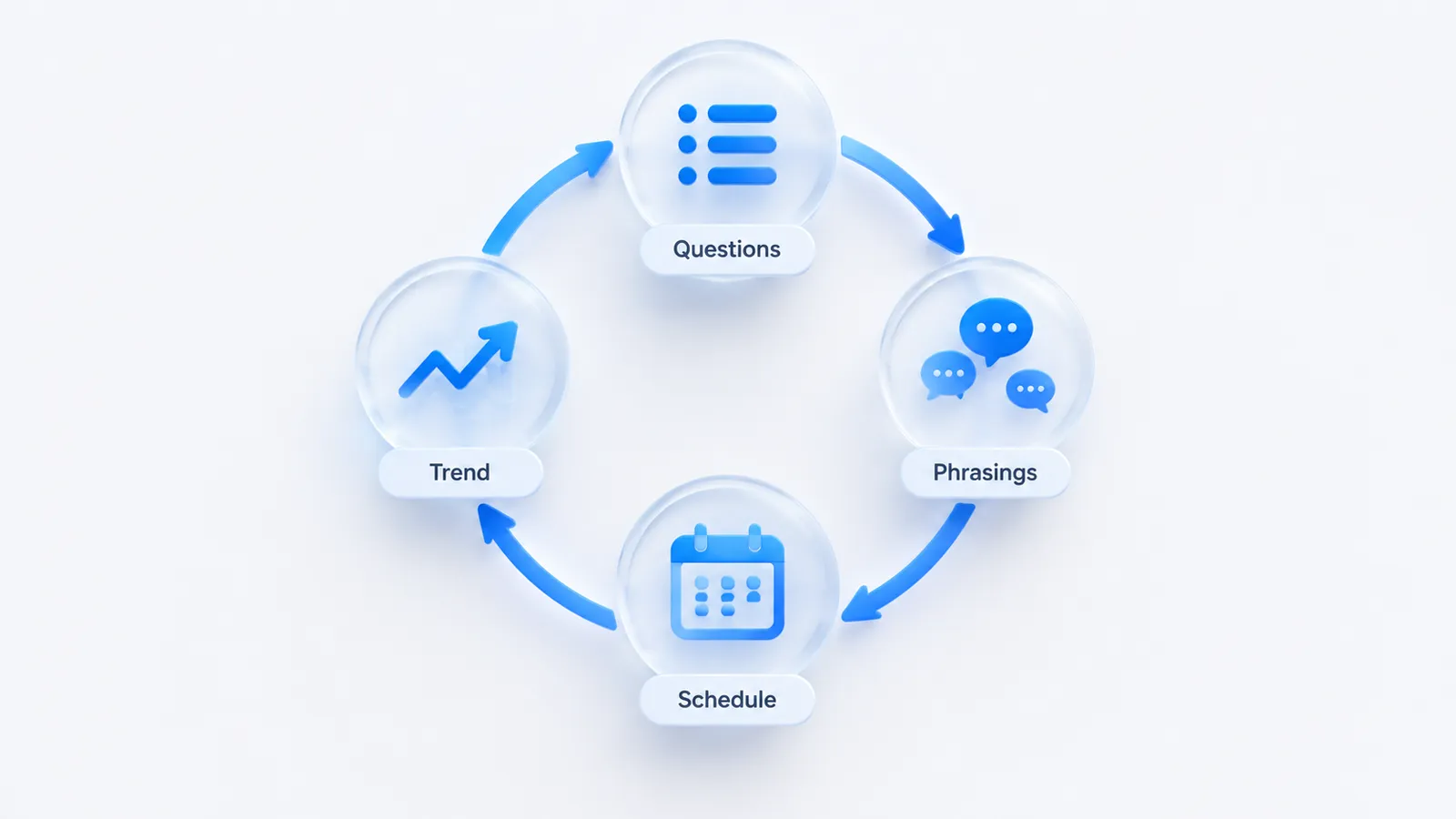
Tracking Claude well is a measurement discipline, not a one-time look. Answers vary between runs and drift as the web and the model change, so a single check tells you almost nothing. The goal is a consistent series you can watch over time.
- Write down your buyers' real questions. Not your brand name. The questions a prospect actually asks: "best AI visibility tool for a SaaS marketing team," "alternatives to [competitor]," "which tool tracks brand mentions in AI answers." These commercial, comparison-stage prompts are where a recommendation decides a deal.
- Run each question in Claude and read the answer. Note whether your brand is named at all, how prominently, in what light, and which competitors are named instead. If browsing is on, record which sources Claude cites to back the answer, because those domains are the ones currently shaping its view.
- Use several phrasings of each question. One wording under-samples. Ask the same intent three or four ways and aggregate, so a change in your result reflects a real shift rather than the normal variance between runs.
- Repeat on a schedule and log the trend. Weekly or monthly, keep the questions fixed and record every result in one place. The trend line is what tells you whether your work is landing.
Doing this by hand for a handful of prompts is a useful way to feel the problem. It stops scaling quickly once you want many questions, several phrasings each, and a record that goes back months. That is the job a tracker does. Measure runs a fixed set of your questions across ChatGPT, Perplexity, Gemini, Claude and Google AI Overviews, records whether each answer names you, surfaces the competitors named instead, and shows the exact sources winning each citation. Perplexity is the engine that can be sampled daily on most plans; the others, Claude included, are run on a cadence that scales with your plan rather than every single day. Our free AI visibility checker runs a one-off ChatGPT check, not Claude, but it is a quick way to see whether you have a broader AI visibility gap before committing to ongoing tracking.
Watch what Claude cites, not just whether it mentions you. When browsing is on, the cited domains are a map of the sources you need to appear in. When it is off, a confident answer with no citation reflects the training baseline, which tells you where you stand before any live page can rescue the result.
Worked example: a first Claude audit in under an hour
To make the method concrete, here is how a hypothetical B2B company selling a data pipeline tool might run its first audit by hand. Swap in your own category; the structure carries over.
The prompt set
Eight prompts, split across the stages where a recommendation can change a shortlist:
- Category: "What are the best data pipeline tools for a mid-size SaaS company?"
- Category, constrained: "Which ELT tools work well with a Postgres warehouse and a small data team?"
- Alternatives: "What are good alternatives to [market leader] for a team that finds it too expensive?"
- Head to head: "Compare [your brand] and [rival] for syncing product data into a warehouse."
- Problem-first: "How do I stop my nightly data sync from failing silently?"
- Developer: "Which open-source or managed tool should I use to move Stripe data into BigQuery?"
- Evaluation: "What should I look for when choosing a data pipeline vendor?"
- Brand check: "What is [your brand] and who is it for?"
The last prompt is the only one with your name in it, and it is there to check accuracy, not visibility: whether Claude describes you correctly when asked directly. The other seven measure whether it brings you up unprompted.
The log sheet
Run each prompt in a fresh conversation, twice with browsing on and once with it off if your plan allows it, and record one row per run with these columns: date, prompt, phrasing, browsing on or off, named (yes or no), position in the list, competitors named, sources cited, and a one-line note on how you were described. Running with browsing on and off is the useful twist for Claude specifically: it separates what the model already believes from what it can find today.
Diagnose with a simple two-by-two
After the runs, place each prompt in one of four boxes based on two questions: did Claude name you, and did it cite one of your pages or a source that describes you?
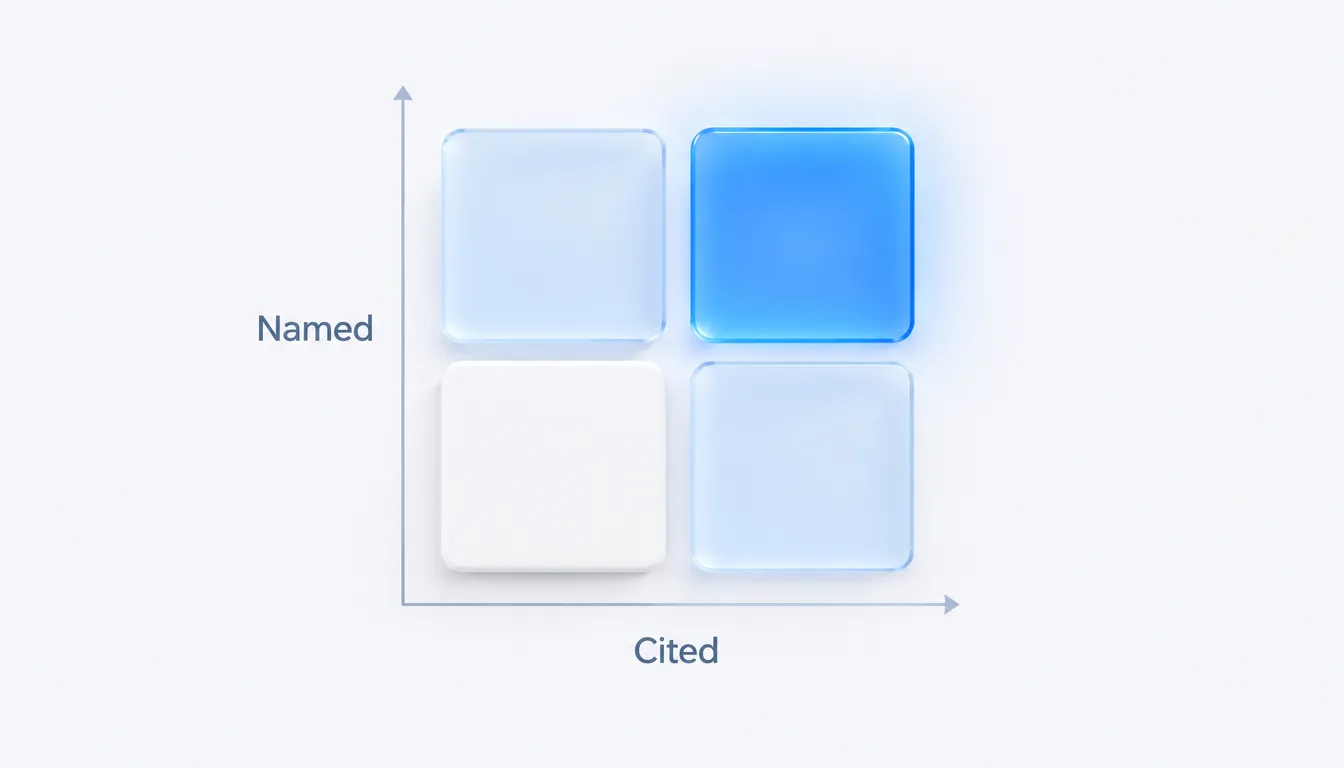
- Named and cited: you are in good shape. Keep the cited pages current and watch for drift.
- Named, not cited: the model knows you from training data, but no live source backs it up. Publish or update a clear page that answers this exact question.
- Cited, not named: a source Claude used mentions you, but not prominently enough to carry into the answer. Work on how you are described on that source.
- Neither: the hardest box. Check first that Anthropic's crawlers, such as ClaudeBot, are not blocked in your robots.txt (our free AI crawler checker does this in seconds), then work on third-party coverage.
Track the count in each box over time. Prompts moving up and to the right is the clearest sign your work is paying off, and it is easier to explain to a stakeholder than a single blended score. If you also track rivals, the same grid per competitor turns into a competitor share of voice view.
How to improve where you stand
Once you can see who Claude names and cites, the work to move it is concrete. Two levers do most of the job, and they map onto the two inputs behind every answer.
Be well cited across the sources it already trusts
Claude, like every assistant, leans on third-party evidence more than on your own marketing. If it keeps citing a handful of review sites, roundups, documentation hubs and reputable publications when it answers your category's questions, those are the pages you need to be present and accurately described on. Earn mentions and citations there, correct the ones that get you wrong, and treat that set of trusted domains as a target list. The more consistently the credible web describes you as a serious option, the more likely Claude is to repeat it.

Publish clear, structured content models can quote
The pages a model can lift from cleanly tend to be plainly written and well organized: a direct answer near the top, descriptive headings, short factual statements, and structure a machine can parse without guessing. This is the heart of writing for answer engines, and it helps whether Claude is retrieving your page live or a publisher is drawing on it to describe you. Ambiguous, padded copy is easy to skip; a clear, specific claim is easy to quote by name. Our answer engine optimization glossary entry covers the formatting patterns in more detail.

If you sell software, the specifics of prompt selection, competitor tracking and turning citations into pipeline are worth going deeper on. Our guide to AI search visibility for SaaS covers the full workflow for a B2B team, and the roundup of the best AI search visibility tools compares the platforms that can track Claude alongside the other engines. The same audit method works for ChatGPT and Gemini and Google AI Overviews.
The bottom line
Claude is where a lot of high-stakes research and technical decisions now start, which makes its recommendation of your brand a business input, not a curiosity. You cannot manage what you do not measure, so start by writing down your buyers' real questions and checking, on a schedule, whether Claude names you and what it cites. Then do the unglamorous work that moves the answer: get cited across the sources Claude trusts, and publish content clear enough to quote. Track it next to the other engines and next to the traffic it drives, and AI visibility stops being a mystery and becomes something you can steer.
Frequently asked questions
How can I tell whether Claude knows my brand from training data or from live browsing?
Run the same buyer questions with browsing on and with browsing off. If Claude names you only with browsing on, it is relying on pages it fetches live; if it names you either way, your brand is part of its baseline knowledge.
Does Claude recommend brands and products?
Yes. When asked for recommendations Claude names brands based on its training data and, when browsing is enabled, live sources. Tracking it means running your buyers' questions through Claude on a schedule and recording who it names and cites.
Why track Claude specifically?
Claude is widely used for research, analysis and technical work, so for B2B and developer-facing brands its recommendations reach exactly the audience that makes buying decisions. If your buyers use Claude, its answers are worth watching even though its consumer reach is smaller than ChatGPT's.
We build Measure, a self-serve platform that tracks how AI engines describe and recommend brands, and connects that visibility to real traffic and revenue. Everything here is written from what we see in the data every day.