 measure
What Is Query Fan-Out? How AI Search Splits Prompts (and How to Optimize for It)
One prompt becomes many hidden searches, and the pages that answer the most of them get cited. Here is how fan-out works in each engine, how to find the sub-queries your buyers trigger, and how to cover and measure them.
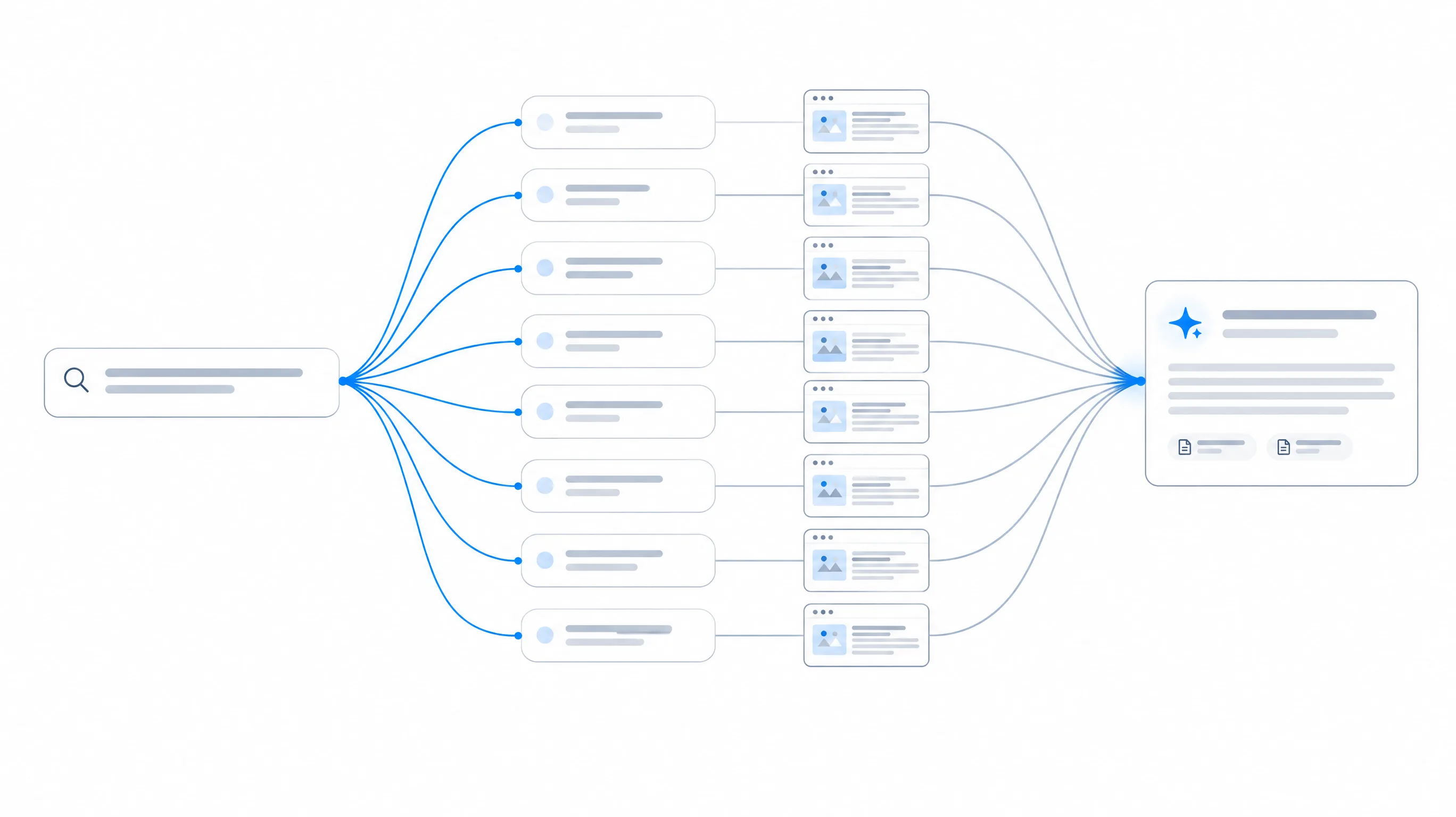
- One complex prompt can trigger a handful to dozens of background searches. Google's Deep Search mode in AI Mode can issue hundreds.
- Engines cite the pages that answer the most sub-queries well, which is why pages that rank nowhere near #1 for the head keyword still get cited.
- Fan-out queries are synthetic and change between runs. Optimize for the recurring intents behind them, not for exact phrasings.
- The practical workflow: collect sub-queries from several runs, cluster them into intents, score each intent, map it to a page section, publish, then measure your fan-out coverage rate and citation rate over time.
What is query fan-out?
Query fan-out is the process an AI search system uses to answer a prompt by breaking it into multiple related searches, running them at the same time, and merging what it finds into one response. The individual searches are called fan-out queries or sub-queries. The user never types them and usually never sees them.
A classic search engine takes your query and returns a ranked list for that exact string. An answer engine does something closer to what a good research assistant does. It reads the question, works out every piece of information a complete answer would need, goes and looks up each piece, and then writes a summary with sources. Fan-out is the "go and look up each piece" step.
Google introduced the term publicly at Google I/O in May 2025 when it launched AI Mode. Head of Search Elizabeth Reid described it as the technique that lets Search break a question into subtopics and issue a multitude of queries simultaneously on the user's behalf. Google's own documentation for site owners now says both AI Overviews and AI Mode may use query fan-out, issuing multiple related searches across subtopics and data sources to develop a response.
The name stuck, and the industry now uses "query fan-out" for the equivalent behaviour in every retrieval-based assistant: ChatGPT search, Perplexity, Gemini, Copilot and Claude with web search. OpenAI, Perplexity and Anthropic don't use Google's term, but the mechanics are the same: rewrite, search several times, rank, synthesize.
Why AI search uses fan-out at all
Fan-out exists because prompts are longer and more specific than keywords. The average Google query is a few words. A prompt to ChatGPT is often a full sentence with constraints, context and a goal: "What's the best CRM for a 6-person agency that already uses Google Workspace and needs client portals, under $50 a seat?" No single page on the web answers that exact question. Plenty of pages answer parts of it.
Fan-out solves three problems at once:
- Coverage. Each constraint in the prompt (team size, integration, feature, budget) becomes its own search, so the answer can satisfy all of them instead of matching the most generic one.
- Grounding. Language models make things up when they answer from memory. Retrieving fresh documents for each sub-question gives the model evidence to quote and sources to cite, which lowers the hallucination rate.
- Freshness. A model's training data is months old. Sub-queries can add the current year, "latest" or "pricing" to pull recent pages, so the answer reflects prices and products as they are now.
The side effect for marketers is the important part: the set of pages an AI answer draws from is no longer the top ten results for one keyword. It is the union of the best results across every sub-query, re-ranked by how well each passage helps the final answer. That changes what it means to "rank".
How query fan-out works, step by step
The exact pipelines are proprietary, but Google's documentation and the visible behaviour of every major engine, point to the same five stages.
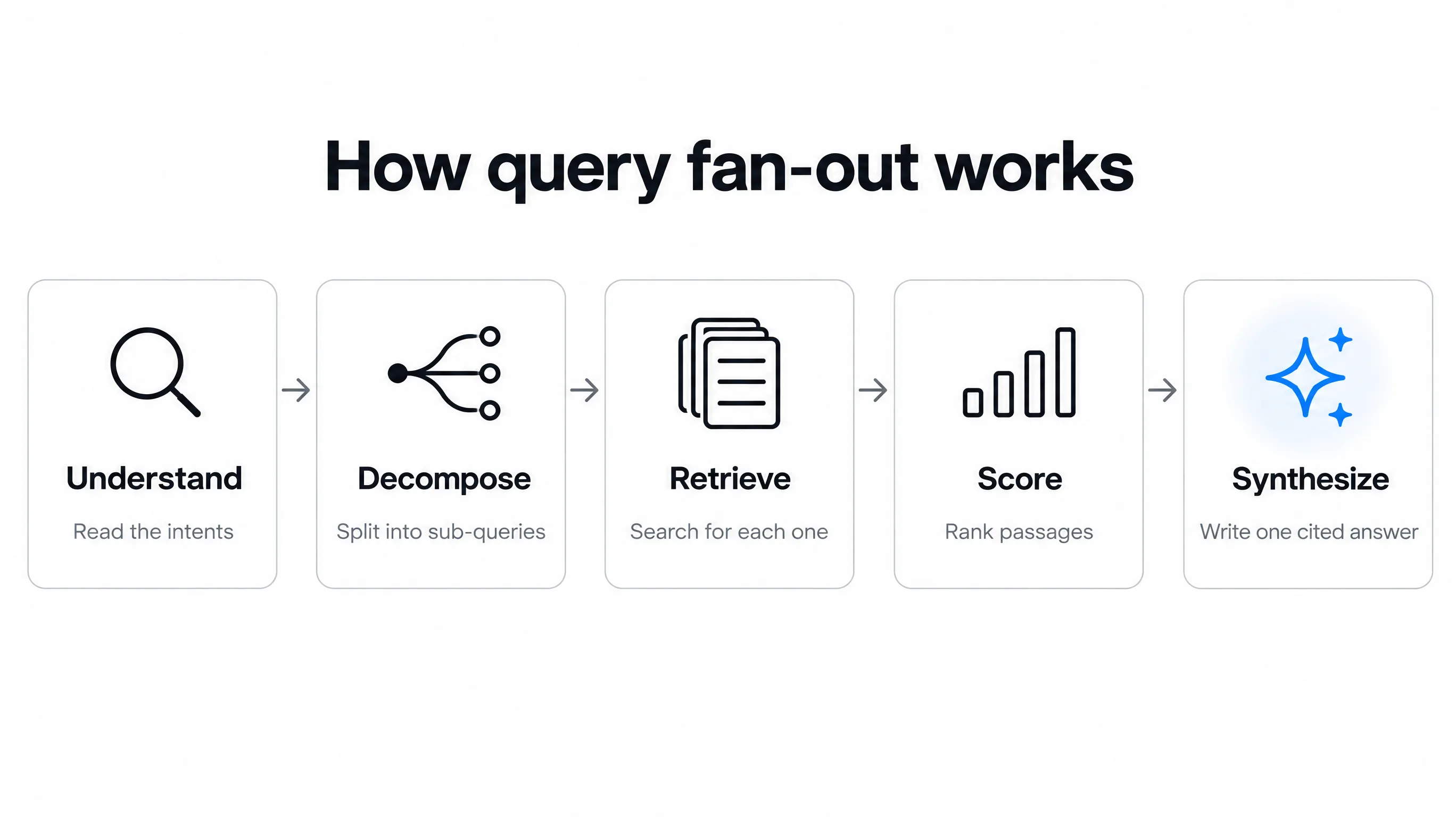
- Understand. The model reads the prompt and identifies the intents inside it. "Best laptop for a college student who edits video and needs long battery life" contains at least three: suitable for students (price, weight), battery life, and video-editing performance. It also infers context the user didn't state, such as location from the account or the current date.
- Decompose. Each intent becomes one or more search queries: "best laptops for college students 2026", "longest battery life laptops", "minimum specs for video editing laptop", "MacBook Air vs Dell XPS for video editing". Complex prompts produce more queries; simple factual prompts may produce one or none.
- Retrieve. The system runs the sub-queries against one or more indexes: Google's web index, Bing (which several assistants rely on), its own crawl, shopping and local data, or a news feed. What it learns from early results can trigger a second round of more specific searches. This iterative loop is what "deep research" modes stretch out to minutes.
- Score. Retrieved documents are split into passages and ranked for how well each passage answers each sub-query, and how much it adds to the overall answer. This is passage-level, not page-level: a page can lose on the head term and still contribute its best paragraph.
- Synthesize. The model writes the answer from the top passages and attaches citations to the sources it used. Some sources are cited inline; others are used but only listed in a sources panel, and some influence the wording without being cited at all.
Because scoring happens per sub-query and per passage, the page that ranks first for the head keyword is not guaranteed a citation. A page ranking seventh that contains the clearest table of battery-life figures can be the one the engine quotes for that sub-question. Ranking still matters, since a page has to be retrieved to be scored, but it is the entry ticket, not the result.
A worked example: one prompt, fourteen sub-queries
Here is a realistic decomposition of a B2B buying prompt, grouped by intent. It is the kind of output you get when you run the same prompt several times across engines and collect the distinct sub-queries.
Prompt: "What's the best project management tool for a 15-person marketing agency that bills clients hourly?"
| Intent | Example fan-out queries | What a cited page needs |
|---|---|---|
| Category shortlist | best project management software for agencies 2026; agency project management tools | A named, dated list with a one-line reason for each pick |
| Team size fit | project management tool for small teams 15 users | Explicit statement of who it suits, with seat limits |
| Billing / time tracking | project management with time tracking and invoicing; billable hours tracking agency | Feature section on time tracking and client billing |
| Pricing | [tool] pricing per user; cheapest agency project management software | A current price table with the date it was checked |
| Comparisons | [tool A] vs [tool B] for agencies | Side-by-side table on the criteria agencies care about |
| Client access | project management tool with client portal | Clear yes/no on guest or client access, and its limits |
| Drawbacks | [tool] limitations; [tool] reviews agencies | An honest cons list, ideally backed by reviews |
| Next step | how to migrate from spreadsheets to project management software | A short migration or setup guide |
Two things stand out. First, only one of the eight intents matches the head keyword ("best project management software for agencies"). Seven are attributes, comparisons, risks and next steps. Second, a single well-built page can answer five or six of them: a pricing table, a "who it's for" section, a time-tracking section, a client-portal FAQ and an honest limitations list. That page becomes a candidate for many sub-queries at once, which is exactly what the scoring stage rewards.
The 8 types of fan-out queries
Most guides list six types. In the sub-queries we capture from live answers, eight patterns recur often enough to plan content around. Knowing the type tells you what kind of content block satisfies it.
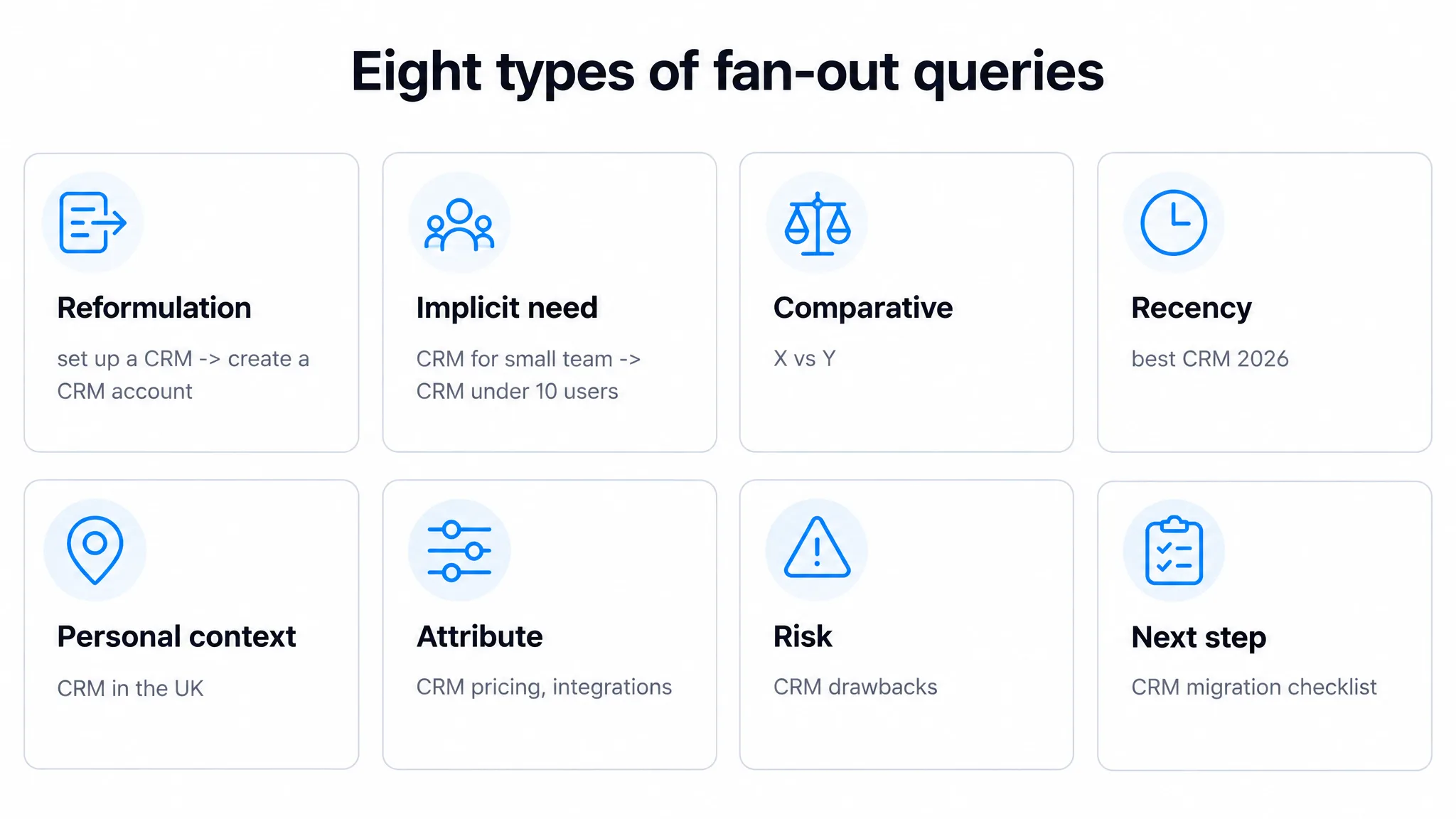
| Type | What the engine is doing | Example | Content that satisfies it |
|---|---|---|---|
| Reformulation | Rephrasing the prompt the way other people would say it | set up a CRM → create a CRM account | Natural synonyms in headings and copy |
| Implicit need | Inferring a requirement the user did not state | CRM for a small team → CRM under 10 users | Explicit fit statements: who it is for, limits |
| Comparative | Weighing options against each other | electric vs manual standing desk | Comparison tables and vs pages |
| Recency | Forcing current information | best CRM 2026; latest pricing | Dated updates, current prices, changelogs |
| Personal context | Adding location, profile or past-chat context | gyms with childcare in Leeds | Location pages, segment pages, local data |
| Attribute | Checking a specific property | [product] pricing, integrations, battery life | Spec tables, feature lists, FAQs per attribute |
| Risk | Looking for downsides before recommending | [product] drawbacks; is [brand] legit | Honest limitations, reviews, guarantees, security |
| Next step | Anticipating what the user does after the answer | how to register a trademark → trademark lawyer cost | How-to guides, checklists, onboarding docs |
The two types most brands ignore are attribute and risk. Engines check specific properties before recommending something, and they actively search for drawbacks to give a balanced answer. If your site doesn't state your pricing, integrations or limitations plainly, the engine gets those facts from a review site, a Reddit thread or a competitor's comparison page, and you lose control of the framing.
How each AI engine fans out
Every assistant fans out, but not identically. The differences matter because they change which index your page has to be in and how many sub-queries a typical prompt generates.
| Engine | How fan-out shows up | Where it retrieves from | Can you see the sub-queries? |
|---|---|---|---|
| Google AI Mode | Named query fan-out; Deep Search runs far more searches for research-style prompts | Google index, Shopping Graph, local and other Google data | No, inferred from cited sources and follow-ups |
| Google AI Overviews | Lighter fan-out on qualifying queries in classic Search | Google index | No |
| ChatGPT search | Rewrites the prompt into one or more web searches, more in thinking and deep research modes | Third-party search providers plus its own crawl (OAI-SearchBot) | Partly, through captured search queries via APIs and some UI views |
| Perplexity | Multi-step search, especially in Pro and Research modes | Its own index and crawl plus web search | Often, in the steps panel |
| Gemini | Fan-out in grounded answers; Deep Research publishes a research plan | Google Search grounding | Deep Research shows its plan |
| Claude (web search) | Runs several searches and refines them as it reads | Web search provider | Yes, the searches are listed in the answer |
| Microsoft Copilot | Multiple Bing searches per prompt | Bing index | Sometimes, as search steps |
The practical takeaway: being indexed by Google is necessary but not sufficient. ChatGPT and Copilot lean on other indexes and crawlers, so your pages also need to be crawlable by Bingbot, OAI-SearchBot and PerplexityBot. Our free AI crawler checker tells you in a few seconds whether your robots.txt blocks any of them. For engine-specific tactics, see our guides to ChatGPT, Perplexity, Gemini and Claude.
Fan-out queries vs long-tail keywords vs People Also Ask
Fan-out queries look like long-tail keywords, and they overlap with People Also Ask questions, which leads to a common mistake: treating them as a keyword list. They are different things with different uses.
| Fan-out queries | Long-tail keywords | People Also Ask | |
|---|---|---|---|
| Who writes them | The AI model | Real people | Real people (aggregated by Google) |
| Search volume | Usually none or unmeasurable | Low but measurable | Not shown, inferred from the parent query |
| Stability | Change from run to run | Stable month to month | Fairly stable, rotate slowly |
| What they reveal | What an engine thinks a complete answer needs | How people phrase a need | Follow-up questions people ask |
| How to use them | Intent checklist for page sections | Targets for pages and headings | FAQ and sub-heading ideas |
The rule of thumb: keywords tell you what to call a page, fan-out tells you what the page must contain. A fan-out query with zero search volume can still be the sub-question that decides whether an engine cites you, because it is asked on behalf of every user who types the parent prompt.
Why query fan-out matters for AI visibility
Fan-out is the mechanism behind most of the things marketers notice about AI search and find confusing.
- It explains citation patterns. When a mid-ranking review site gets cited over the category leader, it is usually because that site answers more of the sub-queries in clean, extractable passages. Our explainer on LLM citations goes deeper on what gets a page cited.
- It explains volatility. Run the same prompt twice and you get different sub-queries, so different pages get retrieved, so different brands appear. Visibility in AI search is a rate across many runs, not a fixed position. That is why serious tracking samples each prompt repeatedly.
- It rewards depth over volume. Ten thin pages each targeting one keyword lose to one thorough page that answers a cluster of related sub-questions. Topic coverage is now measured at the passage level.
- It pulls in third-party sources. Risk and comparison sub-queries send engines to review sites, forums, directories and news. Your off-site footprint becomes part of the answer whether you manage it or not.
- It changes how you measure SEO. A page can win citations without ranking first for anything you track. If you only report rankings, you will miss both the wins and the losses. That is the case for tracking AI share of voice alongside rankings.
How to find fan-out queries (7 methods, free and paid)
Because fan-out is synthetic and probabilistic, no method gives you "the" list. The goal is to collect enough sub-queries from enough runs to see which intents keep coming back. Start with the free methods to learn the shape of your market, then automate.
1. Read the searches Claude runs
With web search on, Claude lists the searches it performs while answering. Ask your target prompt, expand the search steps, and copy every query. Re-run the prompt three to five times in fresh chats; the queries that repeat are your core intents.
2. Read Perplexity's steps panel
Perplexity shows its search steps for multi-step answers, particularly in Pro and Research modes. The steps read like a research plan. Note both the queries and the sources it opens for each, because the sources tell you who currently owns that sub-question.
3. Use Gemini Deep Research's plan
Gemini Deep Research shows a research plan before it starts. That plan is a fan-out in plain English: the list of sub-topics it intends to cover. It is the clearest view any engine gives of how a full answer is decomposed.
4. Ask the model to show its decomposition
Ask ChatGPT or Gemini: "Before answering, list the separate web searches you would run to answer this question completely, then answer it." This is not the engine's real fan-out, since the model is simulating, but it is a fast, free approximation that tends to surface the same intent categories.
5. Mine Google's own surfaces
People Also Ask boxes, AI Mode's suggested follow-ups and the "things to know" style sub-heads in AI Overviews all reflect how Google decomposes a topic. Search your prompt and its two or three shortest variants, then collect every question and sub-heading you see.
6. Pull fan-out from an API
Data providers such as DataForSEO return the search queries ChatGPT issued alongside its answer in their LLM response endpoints. This is real fan-out rather than a simulation, and it scales to hundreds of prompts. It needs a developer and an account with the provider.
7. Track it continuously in an AI visibility platform
A tracking platform runs your prompts on a schedule, stores the sub-queries and cited sources from each run, and shows how they change. In Measure, the Live scan fans one of your prompts into the ways real buyers phrase it, runs each phrasing across the engines you pick and aggregates a mention rate; scheduled tracking stores the fan-out queries ChatGPT returns with each answer. Most dedicated tools in our AI search visibility tools roundup now expose some version of this.
| Method | Cost | Real or simulated | Scale | Best for |
|---|---|---|---|---|
| Claude search steps | Free | Real (for Claude) | Manual | Learning the shape of a topic |
| Perplexity steps | Free / Pro | Real (for Perplexity) | Manual | Seeing who owns each sub-question |
| Gemini Deep Research plan | Free / paid tiers | Real plan, broad | Manual | Research-style prompts |
| Ask the model | Free | Simulated | Manual | Fast brainstorming |
| Google PAA and AI Mode follow-ups | Free | Adjacent signal | Manual | FAQ and heading ideas |
| LLM response API | Pay per call | Real (ChatGPT) | Hundreds of prompts | Teams with a developer |
| AI visibility platform | From $19.99/mo | Real, tracked over time | Ongoing | Measuring change and competitors |
One run is an anecdote. For each target prompt, collect sub-queries from at least five runs, ideally across two or more engines. Normalize them (lowercase, strip years and brand names), group near-duplicates, and count how often each intent appears. Intents that show up in three or more runs are the ones to build content for.
How to decide which sub-queries to cover
A single market can produce hundreds of distinct sub-queries. You can't write for all of them, and you shouldn't. Score each intent cluster on four factors from 1 to 3 and work from the top down.
| Factor | 1 (low) | 3 (high) |
|---|---|---|
| Frequency: how often it appears across runs and engines | Once, one engine | Most runs, several engines |
| Buying weight: how close it is to a purchase decision | Background education | Pricing, comparison, fit, risk |
| Gap: how well you cover it today | Covered clearly already | Not covered anywhere on your site |
| Right to win: how credible you are on it | Outside your expertise | Your product, data or core expertise |
In practice the first wave is almost always the same for every brand: attribute sub-queries about your own product (pricing, integrations, limits, setup time), comparative sub-queries against your top three competitors, and risk sub-queries about your category. These have high buying weight, you have the most authority on them, and most sites cover them badly.
How to optimize for query fan-out: an 8-step playbook
1. Start from prompts, not keywords
Write down the 20 to 50 questions your buyers actually ask an assistant at each stage: discovery ("how do I solve X"), shortlisting ("best X for Y"), comparison ("A vs B") and validation ("is A worth it"). Use sales call notes, support tickets and onboarding surveys, not just keyword tools. These prompts are what you will fan out and track. Our guide to generative engine optimization covers how to build a prompt set.
2. Collect and cluster the sub-queries
Run each prompt through the discovery methods above and pool the results. Cluster sub-queries by intent, not wording: "[tool] price per seat", "how much does [tool] cost" and "[tool] pricing 2026" are one intent. Tag each cluster with its type from the eight above. Then score and rank the clusters.
3. Map each intent to a page section
Build a coverage matrix: intents down the side, your existing pages across the top, and a mark for strong, partial or no coverage. This is the single most useful artifact in fan-out work, because it shows at a glance which intents have no home on your site.
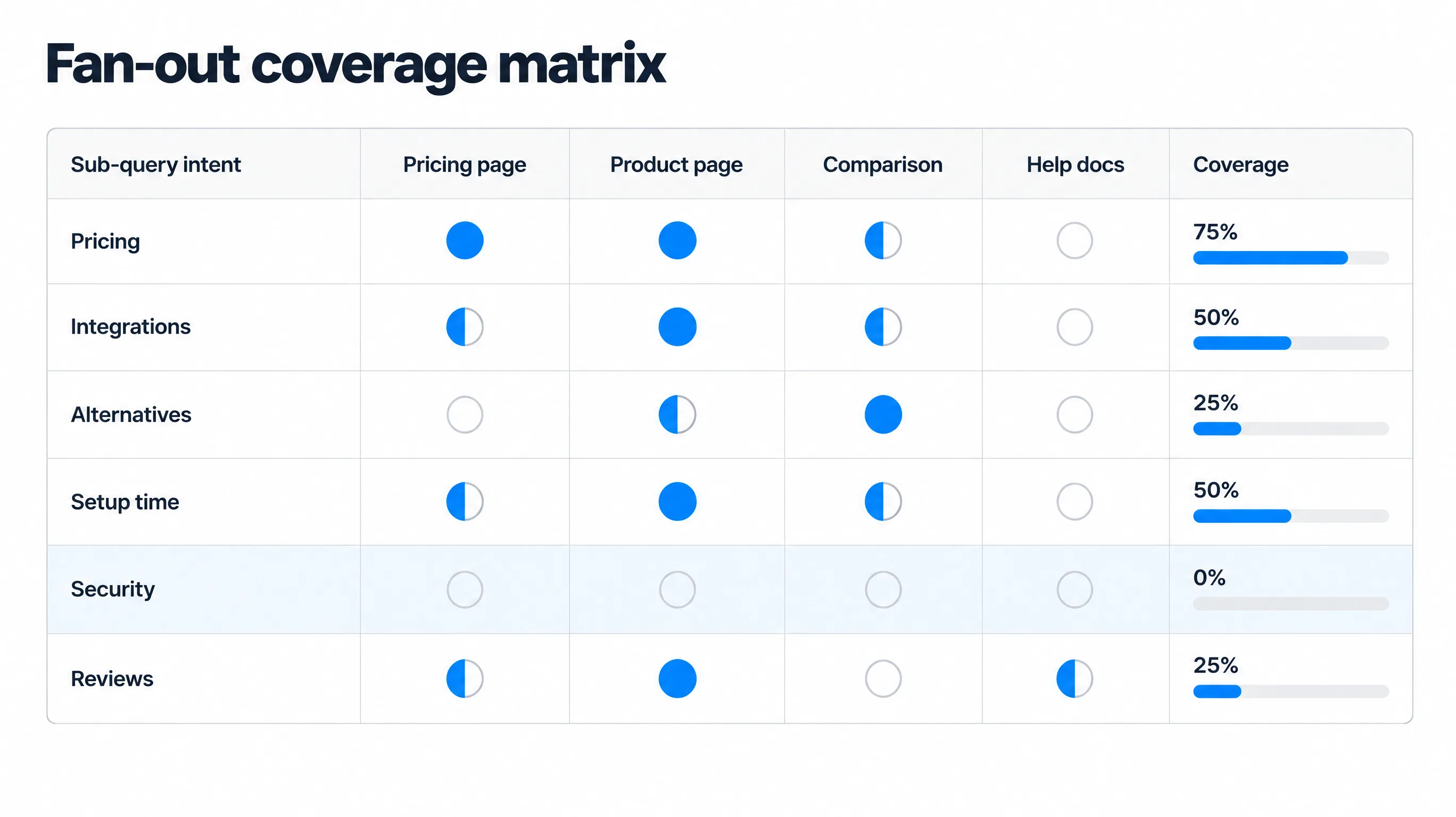
For each gap, decide whether it belongs as a new section on an existing page or as a new page. A useful test: if the intent needs more than about 300 words and has its own comparison or how-to shape, give it a page. If it is a fact or a short answer, make it a section or an FAQ on the closest page.
4. Build pillar and cluster pages around the topic
Group related intents into a topic cluster: one pillar page that answers the broad prompt and links out, and cluster pages that each own a group of sub-queries in depth. Link them both ways with descriptive anchors. Clusters help retrieval in two ways: more of your pages are candidates for more sub-queries, and the internal links help engines understand which page is authoritative for which sub-topic.
5. Write in self-contained, answer-first chunks
Scoring happens at the passage level, so every section should make sense if it were the only thing the engine read. Concretely:
- Put the answer in the first sentence under each heading. "[Tool] costs $12 per user per month on the Team plan, billed annually." Then explain.
- Phrase headings like sub-queries. "Does [tool] have a client portal?" beats "Collaboration features".
- Restate the subject. Write "[Tool]'s free plan includes..." instead of "It includes...". A passage lifted out of context loses the pronoun's referent.
- Define terms where you introduce them, because definitional sub-queries ("what is X") are common and easy to win.
- Use tables for attributes and comparisons. Engines extract structured rows cleanly and often reproduce them.
- Keep paragraphs short and specific. Numbers, names, dates and limits are what get quoted. Adjectives don't.
6. Answer the attribute and risk sub-queries on your own site
This is the highest-return step for most brands. Publish the facts engines go looking for, on pages you control:
- A pricing page with real numbers, what each plan includes, and the date it was last updated.
- An integrations page that lists each integration by name, not a logo wall.
- A plain "who it's for and who it's not for" section on product pages.
- An honest limitations or FAQ section that answers the objections buyers raise.
- Security, compliance, data location and support hours stated in text, not only in a PDF.
- Comparison pages against your main competitors that are fair enough to be credible.
If you don't answer "[your brand] drawbacks", someone else will, and the engine will quote them.
7. Make your pages easy to retrieve and parse
- Allow the AI crawlers (OAI-SearchBot, PerplexityBot, Claude-SearchBot, Bingbot, Googlebot) in robots.txt and make sure your CDN or firewall doesn't block them.
- Render key content in HTML. Several AI crawlers don't run JavaScript, so content that only appears after client-side rendering may be invisible to them.
- Add schema markup (Product, Offer, FAQPage, HowTo, Organization, Article) so facts like price and availability are machine-readable. Schema doesn't earn citations on its own, but it reduces ambiguity when a sub-query asks for a specific attribute.
- Show freshness. Visible "last updated" dates and current-year facts help with recency sub-queries. Update the content, not just the date.
- Consider an llms.txt file that points assistants to your most important pages. It is not a ranking factor, but it is cheap.
8. Cover the sub-queries that happen off your site
Comparison, risk and "best X" sub-queries routinely retrieve third-party pages. You can't write those pages, but you can influence them:
- Find which domains get cited for your prompts (a citation source report does this) and prioritize being listed, reviewed or mentioned there.
- Keep directory and review profiles (G2, Capterra, Trustpilot, Google Business Profile) complete and current.
- Answer real questions in the communities engines cite for your category, such as specific subreddits or forums.
- Publish original data that journalists and roundup writers will reference, which earns mentions in the pages engines retrieve.
- Correct inaccurate facts about your brand on third-party pages when you find them.
Page patterns that win multiple sub-queries
Some page formats naturally answer many sub-queries at once. If you are deciding what to build first, these five have the best ratio of effort to fan-out coverage.
| Page type | Sub-query types it covers | Must include |
|---|---|---|
| Honest comparison (A vs B) | Comparative, attribute, risk | Table on 6 to 10 criteria, a clear verdict per use case |
| Alternatives page | Comparative, implicit need, risk | Who each alternative suits, prices, why someone would switch |
| Pricing page with FAQs | Attribute, recency, risk | Real numbers, inclusions, limits, update date |
| Use-case or industry page | Implicit need, personal context | Specific workflows, examples, fit statement |
| Setup or migration guide | Next step, attribute | Numbered steps, time required, prerequisites |
How to measure fan-out coverage
Optimizing for fan-out without measuring it is guesswork. Track three layers, from what you control to what you want.
1. Fan-out coverage rate (input)
For each tracked prompt, the share of its recurring sub-query intents that your site answers clearly. If a prompt has ten recurring intents and you have a strong section for six, coverage is 60%. Recalculate it each time you refresh your sub-query list. This is the number your content team can move directly.
2. Mention and citation rate (output)
The share of runs in which an engine mentions your brand, and the share in which it cites your domain, per prompt and per engine. Because fan-out makes answers vary, these have to be measured across repeated runs. See our explainer on AI share of voice for how to compare yourself with competitors on the same prompts.
3. AI referral traffic and conversions (outcome)
Sessions and conversions from chatgpt.com, perplexity.ai, gemini.google.com, claude.ai and copilot in GA4, plus AI feature impressions in Search Console's generative AI report. This connects the content work to revenue. Our guide to measuring AI search ROI covers the setup.
After a fan-out content push, coverage should rise first (within days of publishing), citation rate next (typically over two to eight weeks as pages are recrawled and re-retrieved), and referral traffic last. If coverage rises and citations don't move after two months, the problem is usually retrieval (crawling, indexing, rendering) or authority (off-site), not the content itself.
Common query fan-out mistakes
- Treating sub-queries as keywords. Writing a separate thin page for every fan-out phrasing creates near-duplicate content and dilutes authority. Cover intents, not strings.
- Trusting a single run. Fan-out changes between runs, engines and users. Decisions based on one screenshot are noise.
- Stuffing every sub-query into one page. A 10,000-word page that answers everything loosely loses to focused pages that answer each intent well. Use clusters.
- Hiding facts. "Contact us for pricing", image-only spec sheets and PDF-only security docs leave attribute sub-queries to third parties.
- Ignoring the off-site half. Comparison and risk sub-queries often retrieve review sites and forums. Perfect on-site coverage can't fix a bad G2 profile.
- Blocking the crawlers. A robots.txt rule or bot-protection setting that blocks OAI-SearchBot or PerplexityBot removes you from those engines' retrieval no matter how good the content is.
- Measuring only rankings. Fan-out decouples citations from head-term rankings. Without prompt-level tracking you can't see the effect of the work.
A 30/60/90-day query fan-out plan
| Window | Do | Output |
|---|---|---|
| Days 1 to 30 | Pick 20 to 50 buyer prompts; collect fan-out from 5+ runs each; cluster and score intents; check AI crawler access; baseline mention and citation rates | Scored intent list, coverage matrix, baseline metrics |
| Days 31 to 60 | Fix attribute and risk gaps on pricing, product and FAQ pages; publish 2 to 4 comparison or alternatives pages; add schema and update dates | Coverage rate up on priority prompts |
| Days 61 to 90 | Build out cluster pages for the next intent tier; work the top cited third-party domains; re-collect fan-out; compare citation rate and AI referrals against baseline | Measured change in citations and AI traffic, next quarter's list |
The bottom line
Query fan-out turns one prompt into many searches, and the brands that get cited are the ones whose pages answer the most of those searches clearly. You can't see every sub-query and you can't target them one by one, but you don't need to. Collect them across several runs, find the intents that keep recurring, give each intent a clear, self-contained answer on a page you control, make sure AI crawlers can reach it, and measure whether engines start citing you.
If you want to see where you stand first, run your brand through our free AI visibility checker. It takes a minute and needs no card.
Frequently asked questions
What is query fan-out?
Query fan-out is the technique AI search systems use to split one prompt into several related sub-queries, run them in parallel, score the passages they retrieve, and synthesize the best of them into one cited answer. Google named it when it launched AI Mode in 2025.
Does query fan-out apply to ChatGPT, or only Google AI Mode?
It applies to ChatGPT, Perplexity, Gemini, Copilot and Claude with web search as well. Google coined the term, and the industry now uses it for the same behaviour in every assistant that rewrites a prompt into several web searches before answering.
How many sub-queries does an AI engine run per prompt?
It depends on the prompt and the mode. A simple factual prompt may trigger one search or none. A complex buying question commonly triggers several to a few dozen, and research modes such as Google's Deep Search or deep research in ChatGPT and Gemini can run far more.
Are fan-out queries the same as long-tail keywords?
No. Long-tail keywords are phrases real people type and have measurable search volume. Fan-out queries are written by the AI model, change from run to run and usually have no measurable volume. Use keywords to name pages and fan-out to decide what each page must contain.
How do I find the fan-out queries for my topic?
Free options: read the searches Claude lists, Perplexity's steps panel and Gemini Deep Research's plan, or mine People Also Ask and AI Mode follow-ups. At scale, pull ChatGPT's fan-out queries from an LLM response API or track them in an AI visibility platform. Collect at least five runs per prompt.
How do I optimize content for query fan-out?
Cluster the recurring sub-queries into intents, map each intent to a page section in a coverage matrix, answer each one in a self-contained, answer-first chunk, publish pricing, integration and limitation facts plainly, keep AI crawlers unblocked, and build presence on the third-party sites engines cite.
Does schema markup help with query fan-out?
Schema helps engines read specific facts such as price, availability and FAQ answers accurately, which matters for attribute sub-queries. It does not earn citations on its own; the visible content still has to answer the sub-query.
How do I measure query fan-out optimization?
Track three layers: fan-out coverage rate (the share of recurring sub-query intents your site answers), mention and citation rate across repeated runs per engine, and AI referral sessions and conversions in GA4 plus AI feature impressions in Search Console.
We build Measure, a self-serve platform that tracks how AI engines describe and recommend brands, and connects that visibility to real traffic and revenue. Everything here is written from what we see in the data every day.